Affichage des articles dont le libellé est [TUTO]. Afficher tous les articles

mardi 23 juillet 2013

[TUTO] Un Robot autonome pour débutant !!

Voici le schéma et le nécessaire pour réalisé un robot autonome avec peu de matériel !

Le matériel nécessaire:

-Arduino
- 1 LED
- Quelques Jumps
- Capteur Ultrason
- Dual Stepper
- Et un chassis composé de 2 moteur dc

Le schéma de montage:


Le Code:

_______________________________________________________________________

int switchPin= 2; // Right bump switch on pin 2
int swval; // Variable for reading switch status
int ultraSoundSignal = 7; // Ultrasound signal pin
int val = 0;
int ultrasoundValue = 0;
int timecount = 0; // Echo counter
int ledPin = 13; // LED connected to digital pin 13
int motorpinright = 10; // pin for left motor reverse
int motorpinleft = 11; // pin for left motor forward
int motorpinrevright = 5; // pin for right motor reverse
int motorpinrevleft = 6; // pin for right motor forward


void setup() {
pinMode(switchPin, INPUT); // Sets the digital pin as input
pinMode(ledPin, OUTPUT); // Sets the digital pin as output
pinMode(motorpinright, OUTPUT); // Motor drives-----------
pinMode(motorpinleft, OUTPUT); //------------------------
pinMode(motorpinrevright, OUTPUT); //------------------------
pinMode(motorpinrevleft, OUTPUT); //------------------------
}

void loop() {


/* Start Scan
* --------------------------------------------------
*/{
timecount = 0;
val = 0;
pinMode(ultraSoundSignal, OUTPUT); // Switch signalpin to output

/* Send low-high-low pulse to activate the trigger pulse of the sensor
* -------------------------------------------------------------------
*/

digitalWrite(ultraSoundSignal, LOW); // Send low pulse
delayMicroseconds(2); // Wait for 2 microseconds
digitalWrite(ultraSoundSignal, HIGH); // Send high pulse
delayMicroseconds(5); // Wait for 5 microseconds
digitalWrite(ultraSoundSignal, LOW); // Holdoff

/* Listening for echo pulse
* -------------------------------------------------------------------
*/

pinMode(ultraSoundSignal, INPUT); // Switch signalpin to input
val = digitalRead(ultraSoundSignal); // Append signal value to val
while(val == LOW) { // Loop until pin reads a high value
val = digitalRead(ultraSoundSignal);
}

while(val == HIGH) { // Loop until pin reads a high value
val = digitalRead(ultraSoundSignal);
timecount = timecount +1; // Count echo pulse time
}

/* Lite up LED if any value is passed by the echo pulse
* -------------------------------------------------------------------
*/

if(timecount > 0){
digitalWrite(ledPin, HIGH);
delay(50); //LED on for 50 microseconds
digitalWrite(ledPin, LOW);
}

/* Delay of program
* -------------------------------------------------------------------
*/

delay(100);

}
/* Action based on data
* -------------------------------------------------------------------
*/
{
ultrasoundValue = timecount; // Append echo pulse time to ultrasoundValue
}
if (ultrasoundValue > 800)

{
/* Drive straight forward 
*-----------------------------------------------
*/
analogWrite(motorpinleft, 255); //100% speed 
analogWrite(motorpinright, 255); //100% speed0
}
/*------------------------------------------------
*/
else
/* Turn hard right
*---------------------------------------------
*/
{
analogWrite(motorpinleft, 0); //stop left motor 
analogWrite(motorpinright, 0); //stop right motor
analogWrite(motorpinrevright, 0); // stop right rev motor
analogWrite(motorpinrevleft, 0); // stop left rev motor
analogWrite(motorpinrevright, 255); //100% speed
analogWrite(motorpinleft, 255); //100% speed
delay(380); //380 milliseconds
analogWrite(motorpinrevright, 0); // off 
analogWrite(motorpinleft, 0); // off

/*----------------------------------------------
*/
}

/* Backup and turn right when switch gets bumped and closes circuit to ground
*---------------------------------------------------
*/ 
/* 
*/
digitalWrite(switchPin, HIGH); // Sets the pin to high
swval = digitalRead(switchPin); // Read input value and store it
if (swval == LOW) {
analogWrite(motorpinleft, 0); //stop left motor 
analogWrite(motorpinright, 0); //stop right motor
analogWrite(motorpinrevleft, 0); // stop left rev motor 
analogWrite(motorpinrevright, 0); // stop right rev motor
analogWrite(motorpinrevleft, 255); //100% speed 
analogWrite(motorpinrevright, 255); //100% speed
delay(800); //800 milliseconds
analogWrite(motorpinrevleft, 0); // off 
analogWrite(motorpinrevright, 0); // off
analogWrite(motorpinrevright, 255); //100% reverse speed
analogWrite(motorpinleft, 255); //100% forward speed
delay(700); //700 milliseconds
analogWrite(motorpinrevright, 0); // off 
analogWrite(motorpinleft, 0); // off
delay(50); //50 milliseconds
}

/*------------------------------------------------
*/


}

__________________________________________________________________________


jeudi 18 juillet 2013

[TUTO] Un bouton poussoir en minuteur

Le Matériel:

  • une plaque d'essai pour montage sans soudures,
  • des straps,
  • une LED rouge 5mm,
  • une résistance 1/4w de 200 Ohms environ,
  • un bouton poussoir pour CI,


Le Code:

___________________________________________________________________


// --- Déclaration des constantes utiles ---
const int APPUI=LOW; // constante pour tester état BP

// --- Déclaration des constantes des broches E/S numériques ---

const int BP=2; // Constante pour la broche 2
const int LED=3; // Constante pour la broche 3

// --- Déclaration des constantes des broches analogiques ---


// --- Déclaration des variables globales ---


// --- Déclaration des objets utiles pour les fonctionnalités utilisées ---


// ////////////////////////// 2. FONCTION SETUP = Code d'initialisation ////////////////////////// 
// La fonction setup() est exécutée en premier et 1 seule fois, au démarrage du programme

void setup()   { // debut de la fonction setup()

// --- ici instructions à exécuter 1 seule fois au démarrage du programme --- 

// ------- Initialisation fonctionnalités utilisées -------  


// ------- Broches en sorties numériques -------  
 pinMode (LED,OUTPUT); // Broche LED configurée en sortie

// ------- Broches en entrées numériques -------  
 pinMode (BP,INPUT); // Broche BP configurée en entrée

// ------- Activation si besoin du rappel au + (pullup) des broches en entrées numériques -------  
 digitalWrite (BP,HIGH); // Rappel au + activé sur la broche BP configurée en entrée

// ------- Initialisation des variables utilisées -------  

// ----- LED éteinte au début
digitalWrite (LED,LOW); // éteint la LED

} // fin de la fonction setup()
// ********************************************************************************

////////////////////////////////// 3. FONCTION LOOP = Boucle sans fin = coeur du programme //////////////////
// la fonction loop() s'exécute sans fin en boucle aussi longtemps que l'Arduino est sous tension

void loop(){ // debut de la fonction loop()


// --- ici instructions à exécuter par le programme principal --- 

if (digitalRead(BP)==APPUI) { // si le BP est appuyé

   digitalWrite(LED,HIGH); //allume la LED
   delay (5000); // attend 5 secondes - le BP est inactif pendant ce temps
   digitalWrite (LED,LOW); // éteint la LED

} // fin si BP appuyé


} // fin de la fonction loop() - le programme recommence au début de la fonction loop sans fin
// ********************************************************************************

___________________________________________________________________

[TUTO] Un BP en inverseur

Nécessaire:

-une plaque d'essai pour montage sans soudures,
-des straps,
-une LED rouge 5mm,
-une résistance 1/4w de 200 Ohms environ,
-un bouton poussoir pour CI,

Le Schéma:


Le Code:

_________________________________________________________________________


// /////////////////////////////// 1. Entête déclarative /////////////////////// 
// A ce niveau sont déclarées les librairies incluses, les constantes, les variables, les objets utiles...

// --- Déclaration des constantes ---

// --- Inclusion des librairies ---

// --- Déclaration des constantes utiles ---
const int APPUI=LOW; // constante pour tester état BP

// --- Déclaration des constantes des broches E/S numériques ---

const int BP=2; // Constante pour la broche 2
const int LED=3; // Constante pour la broche 3

// --- Déclaration des constantes des broches analogiques ---


// --- Déclaration des variables globales ---
int etatLED=0; // variable d'état de la LED


// --- Déclaration des objets utiles pour les fonctionnalités utilisées ---


// ////////////////////////// 2. FONCTION SETUP = Code d'initialisation ////////////////////////// 
// La fonction setup() est exécutée en premier et 1 seule fois, au démarrage du programme

void setup()   { // debut de la fonction setup()

// --- ici instructions à exécuter 1 seule fois au démarrage du programme --- 

// ------- Initialisation fonctionnalités utilisées -------  


// ------- Broches en sorties numériques -------  
 pinMode (LED,OUTPUT); // Broche LED configurée en sortie

// ------- Broches en entrées numériques -------  
 pinMode (BP,INPUT); // Broche BP configurée en entrée

// ------- Activation si besoin du rappel au + (pullup) des broches en entrées numériques -------  
 digitalWrite (BP,HIGH); // Rappel au + activé sur la broche BP configurée en entrée

// ------- Initialisation des variables utilisées -------  


} // fin de la fonction setup()
// ********************************************************************************

////////////////////////////////// 3. FONCTION LOOP = Boucle sans fin = coeur du programme //////////////////
// la fonction loop() s'exécute sans fin en boucle aussi longtemps que l'Arduino est sous tension

void loop(){ // debut de la fonction loop()

if (digitalRead(BP)==APPUI) { // si appui sur le BP

  if (etatLED==0) etatLED=1; else etatLED=0; // inverse la variable etatLED
  delay(250); // pause anti-rebond
}

// met la LED dans l'état de la variable etatLED
if (etatLED==1) { // si la variable vaut 1
  digitalWrite(LED,HIGH); // la LED est allumée
}
else { // sinon, càd si la variable vaut 0
  digitalWrite(LED,LOW); // la LED est éteinte
 }

// --- ici instructions à exécuter par le programme principal --- 


} // fin de la fonction loop() - le programme recommence au début de la fonction loop sans fin

________________________________________________________________________


dimanche 14 juillet 2013

[TUTO] Faire clignoter une simple LED

Ce programme très simple permet de faire clignoter une LED sur une broche d'une carte Arduino. Rien de très extraordinaire, mais quand on a réussi à programmer ce premier programme très simple, on est content ! Un moyen simple aussi de vérifier que tout fonctionne normalement.

Le matériel nécessaire pour cet exemple:


- Une plaque d'essaie

- Quelques Traps
- Une Led classique
- Une résistance 1/4w de 200 Ohms environ


Et bien évidement notre carte Arduino !!


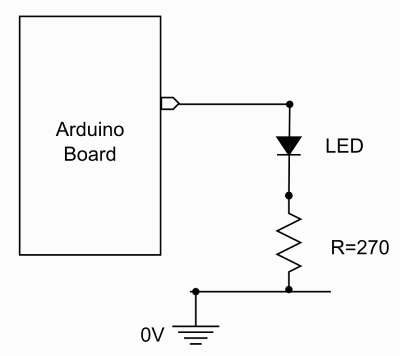
Notre Schéma:


Et Notre Code !!


__________________________________________________________

const int LED=2; //declaration constante de broche 

// --- Déclaration des variables globales ---
// ... 

// --- Initialisation des fonctionnalités utilisées ---
// ... 

//**************** FONCTION SETUP = Code d'initialisation *****
// La fonction setup() est exécutée en premier et 1 seule fois, au démarrage du programme

void setup()   { // debut de la fonction setup()

// --- ici instructions à exécuter au démarrage --- 

 pinMode(LED, OUTPUT); //met la broche en sortie 


} // fin de la fonction setup()
// ********************************************************************************

//*************** FONCTION LOOP = Boucle sans fin = coeur du programme *************
// la fonction loop() s'exécute sans fin en boucle aussi longtemps que l'Arduino est sous tension

void loop(){ // debut de la fonction loop()

// --- ici instructions à exécuter par le programme principal --- 

digitalWrite(LED,HIGH); // met la broche au niveau haut (5V) – allume la LED

delay(500); // pause de 500 millisecondes (ms)

digitalWrite(LED,LOW); // met la broche au niveau bas (0V) – éteint la LED

delay(500); // pause de 500ms
_________________________________________________________________

[TUTO] Arduino Bluetooth RC Car

Arduino Bluetooth RC Car [BT,Android]


Voici un petit exemple de voiture Rc commander en bluetooth via une application mobile Android que vous pouvez trouvez ici:  https://play.google.com/store/apps/details?id=braulio.calle.bluetoothRCcontroller&hl=fr

Le nécessaire pour la réalisation:

- Arduino Uno
- Arduino Motor Shield R3
- TTL Bluetooth Module (Slave or Master-Slave)
- 9V battery
- Car's battery (needs to be greater than 5V)
- 4 LEDs
- 2 NPN transistors (2N2222)
- 2 1kΩ resistors
- 2 120Ω resistors
- 1 SPST switch
- An RC car with two DC motors. One for steering and one for moving forward/back
- Jumper wires (all lengths and rigidity)
- Solder and Soldering Iron


On commence par le Schéma des Leds, 2 Leds à l'avant et 2 à l'arrières


Le Schéma complet


Et le plus Important le code Arduino !!


________________________________________________________________________
char dataIn = 'S';        //data comming from the phone
int pinLeft = 10;     
int pinRight = 11;       
int pinEnableLeftRight = 9;
int pinForward = 5;
int pinBack = 6;
int pinSpeedForwardBack = 3;
int pinfrontLights = 8;
int pinbackLights = 7;
char determinant;         //used in the check function
char det;                 //used in the loop function
int velocity = 0;

void setup()  
{        
Serial.begin(9600);  //If you are using MDFLY module use 9600, for Bluetooth Mate use 115200.
pinMode(pinLeft, OUTPUT);
pinMode(pinRight, OUTPUT);
pinMode(pinForward, OUTPUT);
pinMode(pinBack, OUTPUT);
pinMode(pinEnableLeftRight, OUTPUT);
pinMode(pinSpeedForwardBack, OUTPUT);
pinMode(pinfrontLights, OUTPUT);
pinMode(pinbackLights, OUTPUT);
}

void loop()
{  
    det = check();
      while (det == 'F')   //if incoming data is a F, move foward
      {      
          digitalWrite(pinEnableLeftRight, LOW);  
          analogWrite(pinSpeedForwardBack, velocity); 
          digitalWrite(pinLeft,LOW);
          digitalWrite(pinRight,LOW);   
          digitalWrite(pinForward,HIGH);
          digitalWrite(pinBack,LOW);         
          det = check();           
      }   
      while (det == 'B')   //if incoming data is a B, move back 
      {     
          digitalWrite(pinEnableLeftRight, LOW);  
          analogWrite(pinSpeedForwardBack, velocity);
          digitalWrite(pinLeft,LOW);
          digitalWrite(pinRight,LOW);   
          digitalWrite(pinForward,LOW);
          digitalWrite(pinBack,HIGH);         
          det = check();           
      }  

      while (det == 'L')   //if incoming data is a L, move wheels left
      {      
          digitalWrite(pinEnableLeftRight, HIGH);  
          analogWrite(pinSpeedForwardBack, 0);
          digitalWrite(pinLeft,HIGH);
          digitalWrite(pinRight,LOW);   
          digitalWrite(pinForward,LOW);
          digitalWrite(pinBack,LOW);        
          det = check();           
      }   
      while (det == 'R')   //if incoming data is a R, move wheels right
      {     
          digitalWrite(pinEnableLeftRight, HIGH);  
          analogWrite(pinSpeedForwardBack, 0); 
          digitalWrite(pinLeft,LOW);
          digitalWrite(pinRight,HIGH);   
          digitalWrite(pinForward,LOW);
          digitalWrite(pinBack,LOW);         
          det = check();           
      } 
      
      while (det == 'I')   //if incoming data is a I, turn right forward
      {      
          digitalWrite(pinEnableLeftRight, HIGH);  
          analogWrite(pinSpeedForwardBack, velocity);
          digitalWrite(pinLeft,LOW);
          digitalWrite(pinRight,HIGH);   
          digitalWrite(pinForward,HIGH);
          digitalWrite(pinBack,LOW);                 
          det = check();           
      }   
      while (det == 'J')   //if incoming data is a J, turn right back 
      {       
          digitalWrite(pinEnableLeftRight, HIGH);  
          analogWrite(pinSpeedForwardBack, velocity);
          digitalWrite(pinLeft,LOW);
          digitalWrite(pinRight,HIGH);   
          digitalWrite(pinForward,LOW);
          digitalWrite(pinBack,HIGH);         
          det = check();           
      }           
      while (det == 'G')   //if incoming data is a G, turn left forward
      {  
          digitalWrite(pinEnableLeftRight, HIGH);  
          analogWrite(pinSpeedForwardBack, velocity);
          digitalWrite(pinLeft,HIGH);
          digitalWrite(pinRight,LOW);   
          digitalWrite(pinForward,HIGH);
          digitalWrite(pinBack,LOW);           
          det = check();           
      }     
      while (det == 'H')   //if incoming data is a H, turn left back
      { 
          digitalWrite(pinEnableLeftRight, HIGH);  
          analogWrite(pinSpeedForwardBack, velocity);
          digitalWrite(pinLeft,HIGH);
          digitalWrite(pinRight,LOW);   
          digitalWrite(pinForward,LOW);
          digitalWrite(pinBack,HIGH);           
          det = check();                                               
      }    
      while (det == 'S')   //if incoming data is a S, stop
      { 
          digitalWrite(pinEnableLeftRight, LOW);  
          analogWrite(pinSpeedForwardBack, 0);
          digitalWrite(pinLeft,LOW);
          digitalWrite(pinRight,LOW);   
          digitalWrite(pinForward,LOW);
          digitalWrite(pinBack,LOW);        
          det = check();  
      }
      while (det == 'U')   //if incoming data is a U, turn ON front lights
      { 
          digitalWrite(pinfrontLights, HIGH);           
          det = check();  
      }
      while (det == 'u')   //if incoming data is a u, turn OFF front lights
      { 
          digitalWrite(pinfrontLights, LOW);           
          det = check();  
      }
      while (det == 'W')   //if incoming data is a W, turn ON back lights
      { 
          digitalWrite(pinbackLights, HIGH);           
          det = check();  
      }
      while (det == 'w')   //if incoming data is a w, turn OFF back lights
      { 
          digitalWrite(pinbackLights, LOW); 
          det = check();  
      }
}

int check()
{
  if (Serial.available() > 0)    //Check for data on the serial lines. 
  {    
    dataIn = Serial.read();  //Get the character sent by the phone and store it in 'dataIn'.
        if (dataIn == 'F') 
        {      
          determinant = 'F';
        }   
        else if (dataIn == 'B') 
        {  
          determinant = 'B';  
        }
        else if (dataIn == 'L')   
        {  
          determinant = 'L'; 
        }
        else if (dataIn == 'R')   
        {  
          determinant = 'R';
        }  
        else if (dataIn == 'I')   
        {  
          determinant = 'I';  
        }   
        else if (dataIn == 'J')   
        {   
          determinant = 'J'; 
        }           
        else if (dataIn == 'G')  
        { 
          determinant = 'G';  
        }     
        else if (dataIn == 'H')   
        { 
          determinant = 'H';  
        }    
        else if (dataIn == 'S')  
        {
          determinant = 'S';
        } 
        else if (dataIn == '0')  
        {
          velocity = 0;  
        } 
        else if (dataIn == '1')  
        {
          velocity = 25;
        }
        else if (dataIn == '2')  
        {
          velocity = 50;
        }
        else if (dataIn == '3')  
        {
          velocity = 75;
        }
        else if (dataIn == '4')  
        {
          velocity = 100;
        }
        else if (dataIn == '5')  
        {
          velocity = 125;
        }
        else if (dataIn == '6')  
        {
          velocity = 150;
        }
        else if (dataIn == '7')  
        {
          velocity = 175;
        }
        else if (dataIn == '8')  
        {
          velocity = 200;
        }
        else if (dataIn == '9')  
        {
          velocity = 225;
        }
        else if (dataIn == 'q')  
        {
          velocity = 255;
        }        
        else if (dataIn == 'U')  
        {
          determinant = 'U'; 
        }
        else if (dataIn == 'u')  
        {
          determinant = 'u'; 
        }
        else if (dataIn == 'W')  
        {
          determinant = 'W'; 
        }
        
        else if (dataIn == 'w')  
        {
          determinant = 'w'; 
        }
  } 
return determinant; 
}
_____________________________________________________________________

Ou encore:

_____________________________________________________________________


char dataIn = 'S';        //Character/Data coming from the phone.
int pinForwardBack = 13;     //Pin that controls the car's Forward-Back motor.
int pinLeftRight = 12;       //Pin that controls the car's Left-Right motor.
int pinBrakeLeftRight = 9;  //Pin that enables/disables Left-Right motor.
int pinBrakeForwardBack = 8;  //Pin that enables/disables Forward-Back motor.
int pinLeftRightSpeed = 3;    //Pin that sets the speed for the Left-Right motor.
int pinForwardBackSpeed = 11;  //Pin that sets the speed for the Forward-Back motor.
int pinfrontLights = 4;    //Pin that activates the Front lights.
int pinbackLights = 7;    //Pin that activates the Back lights.
char determinant;         //Used in the check function, stores the character received from the phone.
char det;                 //Used in the loop function, stores the character received from the phone.
int velocity = 0;    //Stores the speed based on the character sent by the phone.

void setup() 
{       
//*************NOTE: If using Bluetooth Mate Silver use 115200 btu
//                   If using MDFLY Bluetooth Module use 9600 btu
Serial.begin(115200);  //Initialize serial communication with Bluetooth module at 115200 btu.
pinMode(pinForwardBack, OUTPUT);
pinMode(pinLeftRight, OUTPUT);
pinMode(pinBrakeLeftRight, OUTPUT);
pinMode(pinBrakeForwardBack, OUTPUT);
pinMode(pinLeftRightSpeed , OUTPUT);
pinMode(pinForwardBackSpeed , OUTPUT);
pinMode(pinfrontLights , OUTPUT);
pinMode(pinbackLights , OUTPUT);
}

void loop()
{ 
    det = check();
      while (det == 'F')   //if incoming data is a F, move forward
      {     
          digitalWrite(pinForwardBack, LOW); 
          digitalWrite(pinBrakeForwardBack, LOW);
          analogWrite(pinForwardBackSpeed,velocity);
          analogWrite(pinLeftRightSpeed,0);  //To make the Left/Right Motor not move, you just need to make its speed 0.    
          det = check();          
      }  
      while (det == 'B')   //if incoming data is a B, move back
      {    
          digitalWrite(pinForwardBack, HIGH); 
          digitalWrite(pinBrakeForwardBack, LOW);
          analogWrite(pinForwardBackSpeed,velocity); 
          analogWrite(pinLeftRightSpeed,0);         
          det = check();          
      } 

      while (det == 'L')   //if incoming data is a L, move wheels left
      {     
          digitalWrite(pinLeftRight, HIGH);
          digitalWrite(pinBrakeLeftRight, LOW);
          digitalWrite(pinForwardBack, LOW);
          analogWrite(pinForwardBackSpeed,0);    //To make the Forward/Back Motor not move, you just need to make its speed 0.
          analogWrite(pinLeftRightSpeed,255);        
          det = check();          
      }  
      while (det == 'R')   //if incoming data is a R, move wheels right
      {    
          digitalWrite(pinLeftRight, LOW);
          digitalWrite(pinBrakeLeftRight, LOW);
          digitalWrite(pinForwardBack, LOW);
          analogWrite(pinForwardBackSpeed,0);
          analogWrite(pinLeftRightSpeed,255);         
          det = check();          
      }
     
      while (det == 'I')   //if incoming data is a I, turn right forward
      {     
          digitalWrite(pinLeftRight, LOW);
          digitalWrite(pinForwardBack, LOW);          
          digitalWrite(pinBrakeLeftRight, LOW); 
          digitalWrite(pinBrakeForwardBack, LOW);  
          analogWrite(pinForwardBackSpeed,velocity);
          analogWrite(pinLeftRightSpeed,255);                  
          det = check();          
      }  
      while (det == 'J')   //if incoming data is a J, turn right back
      {      
          digitalWrite(pinLeftRight, LOW);
          digitalWrite(pinForwardBack, HIGH);         
          digitalWrite(pinBrakeLeftRight, LOW); 
          digitalWrite(pinBrakeForwardBack, LOW);
          analogWrite(pinForwardBackSpeed,velocity);
          analogWrite(pinLeftRightSpeed,255);          
          det = check();          
      }          
      while (det == 'G')   //if incoming data is a G, turn left forward
      { 
          digitalWrite(pinLeftRight, HIGH);       
          digitalWrite(pinForwardBack, LOW);
          digitalWrite(pinBrakeLeftRight, LOW); 
          digitalWrite(pinBrakeForwardBack, LOW); 
          analogWrite(pinForwardBackSpeed,velocity);
          analogWrite(pinLeftRightSpeed,255);          
          det = check();          
      }    
      while (det == 'H')   //if incoming data is a H, turn left back
      {
          digitalWrite(pinLeftRight, HIGH);
          digitalWrite(pinForwardBack, HIGH); 
          digitalWrite(pinBrakeLeftRight, LOW); 
          digitalWrite(pinBrakeForwardBack, LOW);
          analogWrite(pinForwardBackSpeed,velocity);
          analogWrite(pinLeftRightSpeed,255);          
          det = check();                                              
      }   
      while (det == 'S')   //if incoming data is a S, stop
      {
          digitalWrite(pinForwardBack, LOW); 
          digitalWrite(pinLeftRight, LOW);
          analogWrite(pinForwardBackSpeed,0);
          analogWrite(pinLeftRightSpeed,0);          
          det = check(); 
      }
      while (det == 'U')   //if incoming data is a U, turn ON front lights
      {
          digitalWrite(pinfrontLights, HIGH);          
          det = check(); 
      }
      while (det == 'u')   //if incoming data is a u, turn OFF front lights
      {
          digitalWrite(pinfrontLights, LOW);          
          det = check(); 
      }
      while (det == 'W')   //if incoming data is a W, turn ON back lights
      {
          digitalWrite(pinbackLights, HIGH);          
          det = check(); 
      }
      while (det == 'w')   //if incoming data is a w, turn OFF back lights
      {
          digitalWrite(pinbackLights, LOW);
          det = check(); 
      }
}

int check()
{
  if (Serial.available() > 0)    //Check for data on the serial lines.
  {   
    dataIn = Serial.read();  //Get the character sent by the phone and store it in 'dataIn'.
        if (dataIn == 'F')
        {     
          determinant = 'F';
        }  
        else if (dataIn == 'B')
        { 
          determinant = 'B'; 
        }
        else if (dataIn == 'L')  
        { 
          determinant = 'L';
        }
        else if (dataIn == 'R')  
        { 
          determinant = 'R';
        } 
        else if (dataIn == 'I')  
        { 
          determinant = 'I'; 
        }  
        else if (dataIn == 'J')  
        {  
          determinant = 'J';
        }          
        else if (dataIn == 'G') 
        {
          determinant = 'G'; 
        }    
        else if (dataIn == 'H')  
        {
          determinant = 'H'; 
        }   
        else if (dataIn == 'S') 
        {
          determinant = 'S';
        }
        else if (dataIn == '0') 
        {
          velocity = 0;    //"velocity" does not need to be returned.
        }
        else if (dataIn == '1') 
        {
          velocity = 25;
        }
        else if (dataIn == '2') 
        {
          velocity = 50;
        }
        else if (dataIn == '3') 
        {
          velocity = 75;
        }
        else if (dataIn == '4') 
        {
          velocity = 100;
        }
        else if (dataIn == '5') 
        {
          velocity = 125;
        }
        else if (dataIn == '6') 
        {
          velocity = 150;
        }
        else if (dataIn == '7') 
        {
          velocity = 175;
        }
        else if (dataIn == '8') 
        {
          velocity = 200;
        }
        else if (dataIn == '9') 
        {
          velocity = 225;
        }
        else if (dataIn == 'q') 
        {
          velocity = 255;
        }
        else if (dataIn == 'U') 
        {
          determinant = 'U';
        }
        else if (dataIn == 'u') 
        {
          determinant = 'u';
        }
        else if (dataIn == 'W') 
        {
          determinant = 'W';
        }
       
        else if (dataIn == 'w') 
        {
          determinant = 'w';
        }
  }
return determinant;
}

 __________________________________________________________________